Deadzone Rogue 2 Official Site, Demo Access, and Game Details
Find official information for Deadzone Rogue 2, how to access the free demo on Steam, and essential details on this upcoming FPS roguelite shooter.
Published: Deadzone Rogue 2 Wiki Editorial Team
Table of Contents
Official Resources and Game Identity
For players looking for the official home of Deadzone Rogue 2, the primary point of truth is the Steam store page. Developed and published by Prophecy Games, this title serves as a direct follow-up to the original Deadzone Rogue. Because the game is currently in a pre-release phase, all official updates, community discussions, and the latest trailer announcements are centralized within the Steam community hub.
It is important to distinguish the full game from the free trial. While both are officially managed by Prophecy Games, the Deadzone Rogue 2 Demo is a separate entity on the platform. Accessing the demo allows you to experience the core mechanics of the sequel, but it does not include the full scope of content planned for the final launch. Always check the specific AppID on Steam to ensure you are engaging with the correct version of the software.
Accessing the Deadzone Rogue 2 Demo
Prophecy Games recently made the demo live for a broader audience, allowing players to test the roguelite mechanics firsthand. Whether you are playing solo or coordinating with a squad, the demo provides a vertical slice of the gameplay intended for the final release.
Locate the "Download Deadzone Rogue 2 Demo" section typically found on the right sidebar or below the main media gallery.
Click the "Download" button to add the demo to your library.
Launch the application to begin your mission as Talon 13-10.
If you are playing on consoles, check your respective platform’s digital store, as the developers have confirmed demo availability across PC, PS5, and Xbox.
Core Gameplay Mechanics and Features
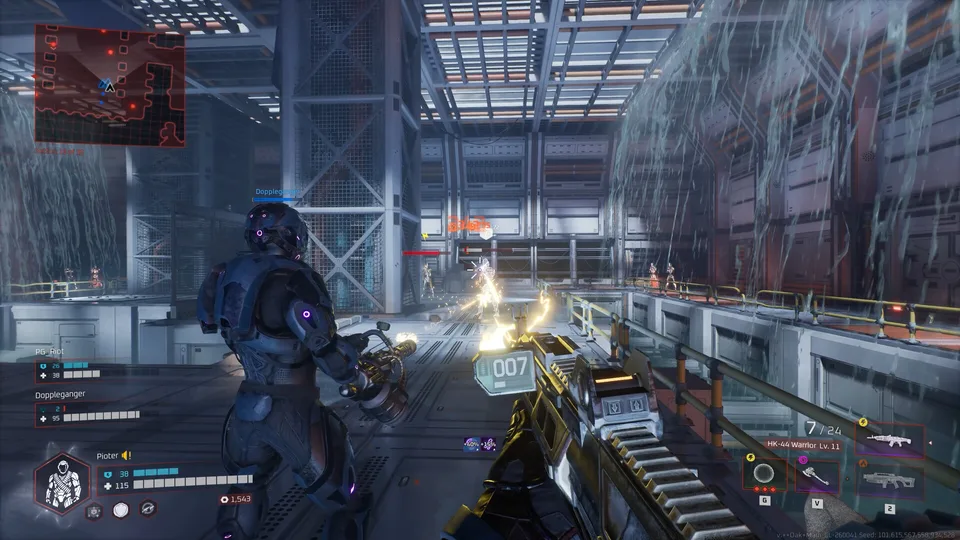
Deadzone Rogue 2 expands upon the foundation of its predecessor by integrating deep roguelite elements into an FPS framework. The narrative places you on a fallen Earth controlled by "Monarch," where you play as Talon 13-10.
A central mechanic to the game is the "Neural Lattice." According to developer information, death is not the end; each time the lattice reconstructs your character, you return with cumulative power. This system allows for permanent upgrades, enabling players to shift their playstyle from a stealth-focused assassin to a heavy-hitting biological juggernaut.
Build Crafting
Combine hundreds of unique augments, perks, and elemental items during your run to forge "impossible builds."
Cooperative Combat
Engage in missions ranging from casual to nightmare difficulty with up to 3-player online co-op, emphasizing squad coordination.
Elemental Warfare
Master over 30 elemental weapons to manipulate the battlefield—such as turning grenades into chain-lightning storms or freezing entire enemy swarms with an ice-augmented SMG.
System Requirements for PC
To ensure a smooth experience during your runs, your hardware should meet the following specifications provided by Prophecy Games. Note that these are the requirements for the current build and may be subject to change as development progresses toward the full release.
Component
Minimum
Recommended
OS
Windows 10 64-bit
Windows 10 64-bit
Processor
Intel i5-4690 / Ryzen 5 1500X
Intel i7-11700 / Ryzen 5 5600
Memory
8 GB RAM
8 GB RAM
Graphics
GTX 1060 6GB / RX 6500XT
RTX 2080 / RX 6700
Storage
10 GB available space
10 GB available space
Frequently Asked Questions
Is the demo progress carried over to the full game?
Official channels have not confirmed save-file carryover. Generally, demos are treated as separate standalone experiences; it is best to assume your progress will be reset upon the full game's launch.
Does the game support cross-platform play?
The Steam store page lists "Cross-Platform Multiplayer" among the features, confirming that the game is designed to facilitate play across different systems.
Where can I report bugs found in the demo?
The best place to provide feedback is the "Community Hub" accessible via the Steam store page. Developers often monitor these boards during the demo phase to gather data for final adjustments.
Staying Updated
Because Deadzone Rogue 2 is currently in the "Coming Soon" stage, the best way to stay informed is to "Wishlist" the game on Steam. This ensures you receive notifications for major updates, release date announcements, and potential news regarding early access or full launch plans. Avoid relying on third-party sites for official release timelines, as the developer's Steam page will always carry the most accurate, real-time status of the project.