Deadzone Rogue 2 Steam Charts and Demo Status Guide
Get the latest on Deadzone Rogue 2 player trends, demo availability, and how it compares to the original title on Steam.
Published: Deadzone Rogue 2 Wiki Editorial Team
Table of Contents
Understanding Deadzone Rogue 2 Availability
Many players seeking the latest engagement metrics for Deadzone Rogue 2 often encounter data for the first game in the series. It is vital to distinguish between the two titles to ensure you are looking at accurate information. Deadzone Rogue 2, developed by Prophecy Games, is the current focus for fans of high-polish first-person action roguelikes.
The game is currently accessible through its official Steam store page. If you are searching for Steam charts, ensure you are not relying on data from the original Deadzone: Rogue, which is a separate product with its own distinct player base and historical performance. Conflating the two can lead to misconceptions about the sequel's current popularity or player retention.
Accessing the Deadzone Rogue 2 Demo
The developer has released a standalone demo, which is an excellent way to gauge if the game suits your preferred playstyle. The demo provides a vertical slice of the intended full-game experience, allowing players to test combat mechanics, character classes, and the roguelike progression systems.
Click the "Download" button to add the demo to your Steam library.
Launch the demo to explore the available missions and character archetypes.
Join the community Discord (often linked within the game or on the store page) to share feedback or find co-op partners.
According to community reports, the demo captures the core "feel" of the game, emphasizing polished gunplay and strategic gear selection. Remember that content in the demo is subject to change as the development team iterates toward the final version.
Gameplay Mechanics and Progression
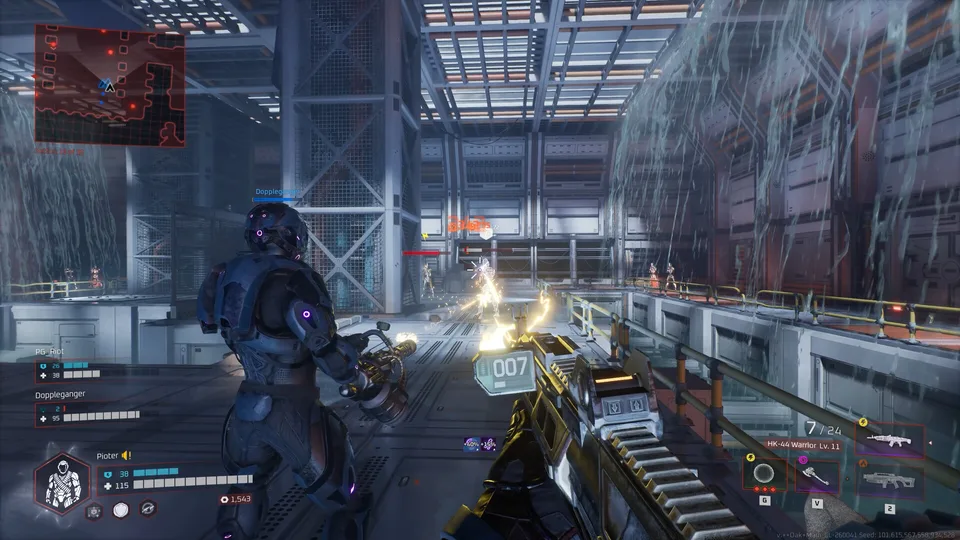
Deadzone Rogue 2 builds upon the foundation of its predecessor by refining the action-roguelike loop. Players engage in room-clearing combat, gathering gear pieces that modify character stats, such as head and chest armor, or elemental weapon procs.
Striker
Focuses on raw gun damage and utilizes grenades for area-of-effect control.
Titan
A defensive-oriented class that uses a shield to block incoming damage and protect the team.
Spectre
Employs tactical movement and taunting discs to stagger enemies while maintaining high mobility.
The meta-progression system is a highlight for many players. By spending resources earned during runs, you can unlock nodes in a skill tree that provides passive bonuses to defense, offense, and utility. This allows for significant customization, enabling you to tailor your build to your specific playstyle—whether you prefer a high-crit glass cannon or a durable support character.
Tips for Mastering the Rogue Loop
To succeed in your runs, paying attention to elemental synergies is crucial. Weapons can be imbued with different elements like cryo, which can trigger shattering effects on chilled targets.
Tip
When choosing perks, prioritize synergies that complement your current weapon's element. For example, if your primary weapon utilizes cryo, look for upgrades that increase cryo damage or extend the duration of freeze effects.
Manage Your Ammo: Some perks provide bonuses based on your magazine status. Learning to balance your reload habits can trigger powerful crit modifiers.
Utilize Stealth: Entering a room often grants a brief moment of stealth. Use this time to survey the environment, identify explosive barrels, and plan your initial engagement.
Co-op Coordination: The game supports full co-op. If you are playing with friends, coordinate your class picks to ensure you have a balance of offense and defense.
FAQ
Is the progress in the demo carried over to the full game?
Generally, demo progress is treated separately. Always check the official Steam store page or community announcements for specific details on potential save transfers.
How does the co-op work in Deadzone Rogue 2?
The game is designed for co-op play, allowing you and your friends to tackle the 30-floor runs together. Coordination between the Striker, Titan, and Spectre classes is key to overcoming the tougher bosses.
Why does the Steam chart data look different from my experience?
If you are viewing charts for "Deadzone: Rogue," you are looking at the predecessor. Always verify the AppID (4465790 for the sequel) to ensure the data corresponds to the specific game you are researching.