Deadzone Rogue 2 Demo Crossplay Guide: How to Play with Friends
Learn how to access crossplay in the Deadzone Rogue 2 Demo, explore its roguelite features, and see what to expect from this sci-fi FPS experience on PC, PS5, and Xbox.
Published: Deadzone Rogue 2 Wiki Editorial Team
Table of Contents
Understanding Crossplay in the Deadzone Rogue 2 Demo
One of the most frequently asked questions regarding the Deadzone Rogue 2 Demo is whether players can team up across different hardware. The answer is a definitive yes. Prophecy Games has integrated cross-platform multiplayer into the demo, enabling seamless cooperation between PC, PlayStation 5, and Xbox users.
In the context of a high-octane FPS roguelite, crossplay is a significant feature. It removes the barrier to entry for friends who might be split across different ecosystems. Whether you are playing on a high-end PC or a console, the ability to coordinate strikes with your squad is fully supported. This ensures that the player base remains unified, which is crucial for a co-op experience that relies on teamwork, communication, and tactical execution.
When you jump into the Deadzone, you are not limited by your platform choice. You can invite friends, manage your lobby, and tackle the challenges Monarch’s forces throw at you, regardless of where they are playing. This implementation of cross-platform play is a testament to the developer's commitment to accessibility and community engagement, even during the demo phase.
What to Expect in the Deadzone Rogue 2 Demo
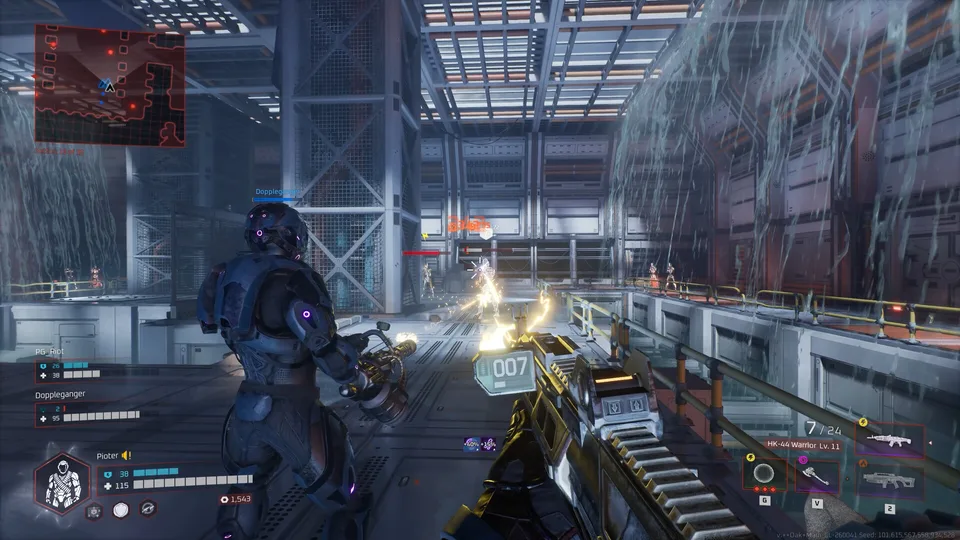
The Deadzone Rogue 2 Demo is not just a vertical slice; it is a substantial introduction to the core loop of the full game. Set on a fallen Earth, the game casts you as "Talon 13-10," a character navigating a hostile, sci-fi landscape. The demo showcases the fundamental mechanics that define the series: fast-paced FPS combat, roguelite progression, and deep weapon customization.
Solo or Co-op Combat
The demo allows you to fight alone or join forces with up to two other players. Cooperative play emphasizes squad coordination, allowing you to tackle missions at various difficulty levels, ranging from casual to "nightmare."
Roguelite Progression
Death is not the end. The "Neural Lattice" system allows you to return stronger after each run. You can slot in imprints and resonances to permanently upgrade your loadout, ensuring that even failed runs contribute to your long-term power.
Deep Build Customization
With over 30 elemental weapons and hundreds of unique augments, the combat allows for immense variety. You can transform a standard grenade into a chain-lightning storm or freeze enemies with an ice-augmented SMG, allowing you to craft a build that fits your specific playstyle.
Getting Started with the Demo
Accessing the demo is straightforward, but it is important to distinguish it from the full game, which is currently slated for a future release. The demo is available on Steam and serves as the primary gateway to experiencing the gameplay loop before the full launch.
Install the Demo: Click the "Install Demo" button to add it to your library.
Launch and Connect: Once installed, launch the game. Ensure your crossplay settings are enabled in the options menu to play with friends on other platforms.
Invite Friends: Use the in-game social menu to invite friends from your platform or via cross-platform friend codes.
System Requirements
To ensure a smooth experience in the Deadzone Rogue 2 Demo, your system should meet the following specifications. Because the game features intensive particle effects and high-fidelity combat, meeting these requirements is recommended for optimal performance.
Minimum:
OS: Windows 10 64-bit
Processor: Intel i5-4690 or AMD Ryzen 5 1500X
Memory: 8 GB RAM
Graphics: NVIDIA GeForce GTX 1060 6GB or Radeon RX 6500XT
Storage: 10 GB available space
Recommended:
Processor: Intel i7-11700 or AMD Ryzen 5 5600
Memory: 12 GB RAM
Graphics: NVIDIA RTX 2080 or Radeon RX6700
Mastering Combat and Strategy
The core appeal of Deadzone Rogue 2 lies in its combat versatility. Unlike standard shooters, this game forces you to constantly adapt your strategy based on the augments and weapons you find during a run.
The Importance of Augments
Augments are the lifeblood of your build. They change how your weapons behave and how you interact with the environment. For instance, pairing a weapon that applies a fire status effect with a "berserker" perk can create a high-damage, high-risk playstyle. Conversely, choosing stealth-oriented augments allows you to play as a tactical assassin, picking off enemies before they even realize you are there.
Tip
Focus on Elemental Synergies: Don't just pick the weapon with the highest damage number. Look for augments that interact with your current weapon type. Turning a standard SMG into an ice-based room-clearer is often more effective than simply upgrading raw damage.
Tactical Teamwork
In co-op, communication is key. Since the game features varying difficulty levels, you and your squad should discuss your roles before entering a zone. One player might act as the "Juggernaut," drawing enemy fire, while the others provide crowd control or precision damage. The game is designed to reward players who think strategically rather than just rushing into combat.
Frequently Asked Questions
Is the Deadzone Rogue 2 Demo free?
Yes, the demo is free to play. You can download and play it via the Steam store page.
Can I transfer my demo progress to the full game?
The demo is intended as a standalone experience. While you can enjoy the progression systems within the demo, check the official developer announcements closer to the full game release regarding save transfers.
Do I need a specific account to play cross-platform?
The game utilizes its own internal systems to facilitate cross-platform play. Ensure you have followed the in-game prompts to link or identify your account so you can find your friends easily.
What is the difference between the Demo and the Full Game?
The demo provides a limited selection of content to showcase the gameplay loop. The full game will feature the complete campaign, expanded story elements, and additional content not found in the demo. Wishlist the full game on Steam to stay updated on its release.
Final Thoughts on the Experience
The Deadzone Rogue 2 Demo offers a compelling look at what Prophecy Games has in store. By including crossplay right from the start, the developers have ensured that the community can test the stability and fun factor of the cooperative mechanics on a larger scale. Whether you are a fan of the first game or a newcomer to the Deadzone franchise, the demo provides ample opportunity to test your reflexes and strategic thinking against the Monarch’s forces.
Remember to keep an eye on the official Steam store page for the full game to see when the complete experience launches. In the meantime, dive into the demo, experiment with different weapon builds, and enjoy the chaotic, fast-paced combat with your friends.