Is Deadzone Rogue 2 Available on Android? Platform Guide
Searching for Deadzone Rogue 2 on Android? Learn about the official platforms, including the current PC and console demo availability for this FPS roguelite.
Published: Deadzone Rogue 2 Wiki Editorial Team
Table of Contents
Is Deadzone Rogue 2 Coming to Android?
If you have been searching for Deadzone Rogue 2 on mobile devices, it is important to clarify the current platform landscape. As of the latest updates from developer Prophecy Games, Deadzone Rogue 2 is not available on Android, nor have there been official announcements regarding a mobile port.
The game is designed as a high-fidelity FPS roguelite, utilizing advanced graphics and mechanics that are currently optimized for PC (via Steam) and current-generation consoles (PS5 and Xbox). While many roguelite games eventually find their way to mobile platforms, Deadzone Rogue 2 is presently focusing its development on these primary gaming ecosystems. If you see third-party sites claiming an "APK" or mobile download for this specific title, it is advisable to avoid them, as they are not legitimate sources and may pose security risks.
Understanding the Deadzone Rogue 2 Experience
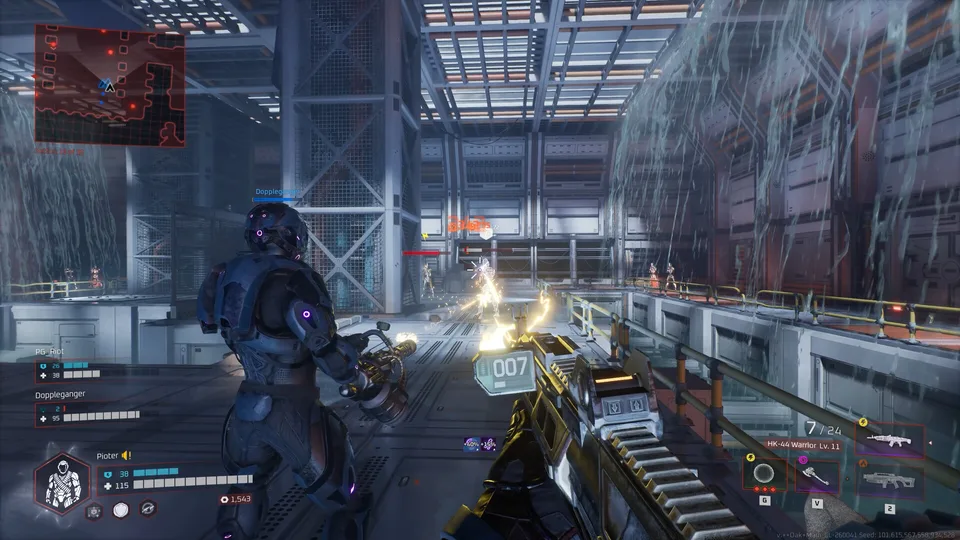
Deadzone Rogue 2 is the ambitious follow-up to the original Deadzone Rogue, a sci-fi FPS roguelite that gained a significant following for its intense action and replayability. Prophecy Games has designed this sequel to amplify the core mechanics that fans loved in the first game while introducing a more expansive campaign.
The game places you in the boots of Talon 13-10, fighting against the forces of Monarch on a fallen Earth. The core gameplay loop revolves around high-stakes combat, where death is not the end but a reset point that allows you to return stronger. You can tackle the missions solo or team up with friends in 3-player online co-op.
Solo Campaign
Experience the story of Talon 13-10 on your own terms. The game is built to scale, ensuring that solo players can tackle missions at any difficulty level, from casual to nightmare.
Online Co-op
Join up to two other players to coordinate strikes and take down Monarch’s machines. The game supports cross-platform multiplayer, allowing friends on different systems to play together.
How to Play the Deadzone Rogue 2 Demo
While the full version of Deadzone Rogue 2 is still "Coming soon," Prophecy Games has released a playable demo for players to get a taste of the mechanics. This demo is a separate entity from the full game app and is the best way to experience the combat and customization systems before the official launch.
Scroll down to the "Download Deadzone Rogue 2 Demo" section on the right-hand side or the main store page.
Click the "Download" button to add the demo (AppID: 4541470) to your Steam library.
Install the demo files and launch the game from your library.
Follow the in-game prompts to jump into the Deadzone and start your first run.
Tip
The demo is free to play, but it is not the full game. Progress made in the demo may not necessarily carry over to the final release, so treat this as a testing ground for combat styles and weapon combinations.
Core Gameplay Features
The strength of Deadzone Rogue 2 lies in its depth of customization and the "Neural Lattice" system. Unlike standard shooters, this game emphasizes "impossible builds" created by combining hundreds of unique augments, elemental weapons, and perks.
Combat and Customization
You are not locked into a single playstyle. You can mix and match abilities to turn a simple grenade into a chain-lightning storm or use an ice-augmented SMG to shatter waves of enemies. The game features over 30 elemental weapons, each providing different tactical advantages against Monarch’s biomechanical hordes.
Progression System
Each run in the game contributes to your overall progression. Through the Neural Lattice, you can slot in imprints and resonances that provide permanent upgrades to your loadout. Whether you prefer to play as a cybernetic sniper or a biological juggernaut, the game rewards strategic choices and experimentation.
System Requirements for PC
Since the game is currently targeting PC as a primary platform, ensuring your hardware meets the requirements is essential for a smooth experience.
OS: Windows 10 64-bit
Processor: Intel i5-4690 or AMD Ryzen 5 1500X (Minimum)
For a better experience, the developers recommend using an Intel i7-11700 or AMD Ryzen 5 5600 processor paired with an NVIDIA RTX 2080 or Radeon RX 6700 graphics card.
FAQ
Is the Deadzone Rogue 2 Demo the same as the full game?
No. The demo (AppID: 4541470) is a specific slice of content provided by the developers to showcase the game's mechanics and allow for community feedback. It is distinct from the full game (AppID: 4465790) which is currently in development.
Can I play with friends on different platforms?
Yes, the game features cross-platform multiplayer, allowing for online co-op sessions across PC, PS5, and Xbox.
How do I get notified about the full release?
The best way to stay updated is to visit the Steam store page and click "Add to your wishlist." Steam will send you a notification as soon as the game becomes available for purchase.