Deadzone Rogue 2 on Steam Deck: Compatibility and Performance Outlook
Discover the current Steam Deck compatibility status for Deadzone Rogue 2. Learn how to test the game using the demo and optimize your handheld experience.
Published: Deadzone Rogue 2 Wiki Editorial Team
Table of Contents
Understanding Deadzone Rogue 2 on Steam Deck
For many gamers, the Steam Deck has become the primary platform for FPS roguelites. The ability to jump into a quick, high-intensity run between daily tasks is a perfect match for the genre. If you are looking to play Deadzone Rogue 2 on your handheld, the most important thing to note is that Valve currently categorizes the game's compatibility as Unknown.
"Unknown" does not mean the game will not run. It simply means that Valve’s testing team has not yet verified the title against the specific benchmarks required for the "Verified" or "Playable" badges. Because Deadzone Rogue 2 is a new release—with the full game currently marked as "Coming soon"—this status is common.
However, there is a strong indicator that the game will be suitable for the device: the inclusion of Full Controller Support. The developers have confirmed compatibility for Xbox, DualShock, and DualSense controllers. In the ecosystem of Steam Deck gaming, native controller support is usually the biggest hurdle for handheld play. Since the game is built with controller inputs in mind from the ground up, the barrier to entry for the Steam Deck is significantly lower than for mouse-and-keyboard-only titles.
How to Test Compatibility with the Demo
Since the full version of Deadzone Rogue 2 is not yet released, you do not have to wait to see how it performs on your hardware. Prophecy Games has released a dedicated demo (AppID: 4541470) that allows players to experience the gameplay loop.
Testing the demo is the most accurate way to gauge how the final product will run on your specific Steam Deck model (whether you are using an LCD or OLED version).
Install the Demo: Navigate to the Deadzone Rogue 2 store page or search directly for "Deadzone Rogue 2 Demo" in your Steam Library.
Check Controller Layouts: Once in-game, press the Steam button and navigate to the Controller Settings. Even if the game has full support, sometimes community layouts offer better sensitivity curves for FPS games on a handheld.
Monitor Performance: Use the Steam Deck's "Performance Overlay" (set to level 2 or 3) to monitor your frame rate during intense combat.
Adjust Graphics: If the frame rate dips during heavy action—such as when multiple biomechanical hordes appear on screen—lower the graphical settings, starting with shadows and anti-aliasing.
By testing the demo, you are essentially testing the engine's capability on the Deck's APU. If the demo runs smoothly, it is highly probable that the base campaign of the full game will perform similarly, provided the developers maintain consistent optimization.
What to Expect from the Gameplay Experience
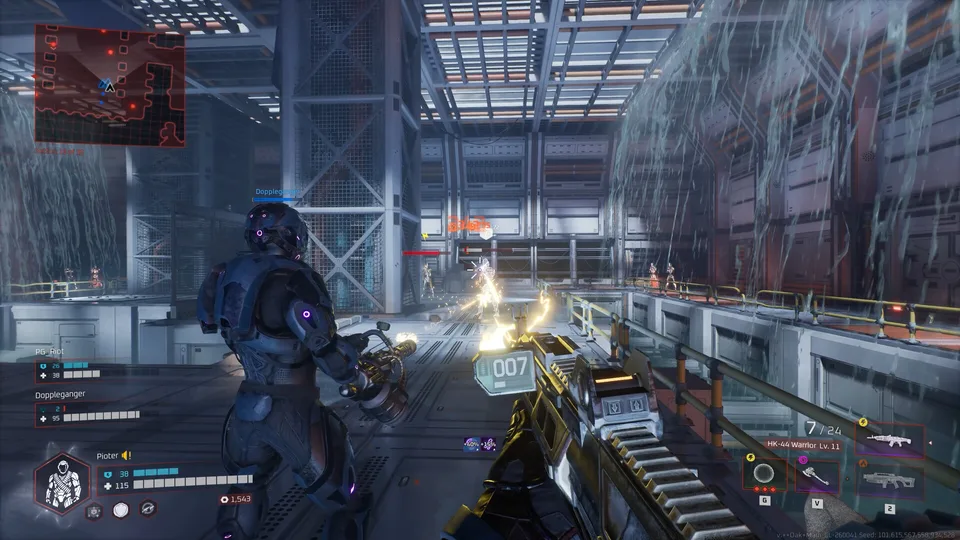
Deadzone Rogue 2 is a sci-fi FPS roguelite that emphasizes movement, build variety, and high-intensity combat. These are genres that generally translate very well to the Steam Deck.
The game features mechanics like "Neural Lattice" upgrades and a wide variety of elemental weapons. On a handheld, the screen size can sometimes make small UI elements hard to read. However, because the developers have integrated features like full controller support and accessibility options—such as "Playable without Quick Time Events"—it suggests a focus on making the game accessible across different input methods.
If you are playing solo or with friends, the "Online Co-op" feature will require a stable internet connection. While the Steam Deck handles network traffic well, keep in mind that co-op sessions may place a slightly higher load on the system compared to solo play. If you notice stuttering during multiplayer, consider dropping the resolution scaling slightly to prioritize a consistent frame rate over visual fidelity.
System Requirements and Hardware Optimization
When assessing whether your Steam Deck can handle the full game, it helps to look at the minimum requirements provided for PC. The developers recommend an Intel i5-4690 or AMD Ryzen 5 1500X processor and an NVIDIA GeForce GTX 1060 6GB (or equivalent).
The Steam Deck’s custom APU is quite capable, but it is important to manage expectations regarding modern titles.
Tip
Optimize for Battery Life: Since this is a roguelite, you might find yourself playing in long sessions. To extend your battery life, cap the frame rate at 40 FPS or 45 FPS in the Steam Deck performance menu. This provides a smoother experience than 30 FPS but consumes significantly less power than pushing for 60 FPS, which can be demanding for an FPS title.
The game requires 10 GB of storage space. This is relatively modest by modern standards, making it a great candidate to keep installed on your internal SSD or a high-speed microSD card without worrying about storage bloat.
Preparing Your Steam Deck for Launch
If you are planning to jump into the full release of Deadzone Rogue 2 as soon as it launches, taking a few preparatory steps can ensure a smoother experience.
[ ] Update SteamOS: Ensure your Deck is running the latest stable version of SteamOS to take advantage of the latest driver improvements.
[ ] Check Shader Caches: Upon launching for the first time, allow the Steam Deck to download any necessary shader pre-caches. This helps prevent "stutter" during combat.
[ ] Explore Input Settings: If the default aiming feels "floaty," experiment with the Steam Deck's "Gyro Aiming." Many players find that enabling gyro for fine-tuned aiming is a game-changer for FPS titles on handhelds.
[ ] Join the Community: Keep an eye on the Steam Community Hub for the game. If there are known performance issues, other Deck users are usually the first to post "best settings" guides.
FAQ
Is Deadzone Rogue 2 "Verified" for Steam Deck?
No, the current status is "Unknown." This does not mean it won't work; it simply means Valve has not yet officially tested it. Given the Full Controller Support, it is a strong candidate for a future "Playable" or "Verified" rating.
Can I play the demo on my Steam Deck?
Yes. The Deadzone Rogue 2 Demo (AppID: 4541470) is available on Steam and can be installed and played on the Steam Deck to test performance and controls before the full game releases.
Will the full game support co-op on handheld?
The game supports online co-op. You can play this on your Steam Deck, provided you have a stable broadband internet connection. Be aware that multiplayer sessions may consume more battery and system resources than solo play.
Does the game require an always-online connection?
The system requirements mention a "Broadband Internet connection." While the game features single-player content, ensure your Deck is connected to the internet to verify the game and access online features or updates.