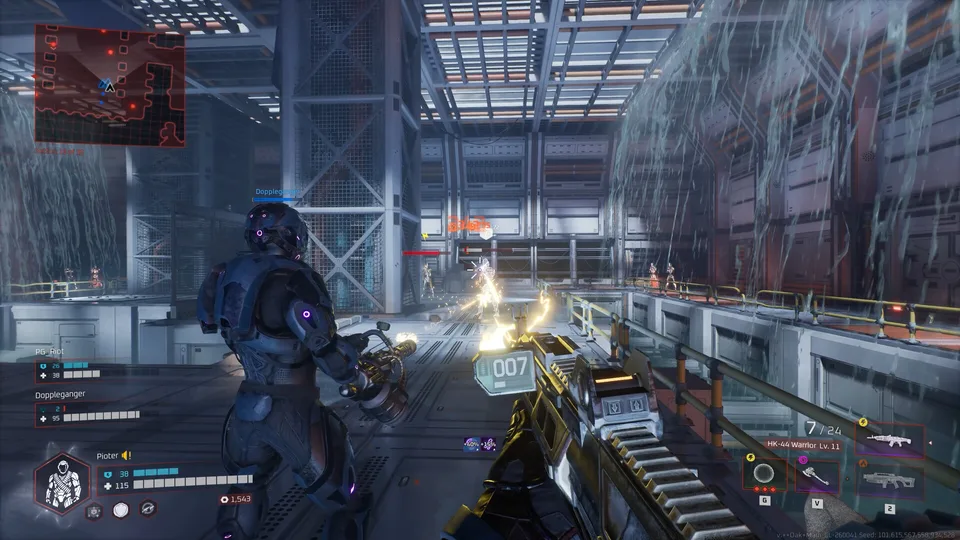
Deadzone Rogue 2: Everything We Know About the FPS Roguelite Sequel
Explore the Deadzone Rogue 2 demo, learn about its sci-fi roguelite mechanics, and get the latest details on the upcoming full release from Prophecy Games.
Published: Deadzone Rogue 2 Wiki Editorial Team
Table of Contents
Playing the Deadzone Rogue 2 Demo
If you are eager to jump into the action, the Deadzone Rogue 2 demo offers a substantial look at the core gameplay loop. As of October 2026, the demo is live across multiple platforms, including PC via Steam, PlayStation 5, and Xbox. This is the best way to familiarize yourself with the movement, combat, and build-crafting systems before the full release.
The demo allows you to experience the game either solo or with friends. It serves as a standalone slice of the game, designed to showcase the "feel" of the combat and the intensity of the encounters against the machines of Monarch.
Scroll down to the "Download Deadzone Rogue 2 Demo" section.
Click the "Download" button to add the demo to your library.
Launch the game through your Steam client to begin your run.
What to Expect in Deadzone Rogue 2
Deadzone Rogue 2 is a sequel to the well-received sci-fi FPS roguelite Deadzone Rogue. Developed by Prophecy Games, the title aims to refine and expand upon the fast-paced, build-heavy combat that defined the original. You take on the role of Talon 13-10, a test pilot navigating a fallen Earth that has been overrun by an AI entity known as Monarch.
The game is built around a "death is only the beginning" philosophy. Every time your character falls, your neural lattice rebuilds you, allowing you to return stronger than before. This progression system is central to the roguelite experience, ensuring that even failed runs contribute to your long-term power.
The campaign is designed to be flexible, supporting both solo play and up to 3-player co-op. Whether you prefer the methodical approach of a solo run or the chaotic coordination of a squad, the game scales to accommodate your playstyle.
Mastering Combat and Build Crafting
The core of Deadzone Rogue 2 lies in its deep customization. Combat is not just about aiming; it is about combining weapons, augments, and elemental effects to create synergistic "builds."
During a run, you will encounter various items and perks that fundamentally change how your equipment functions. For example, you might find an upgrade that turns a standard grenade into a chain-lightning storm, or an augment that allows your SMG to shatter enemies with ice damage.
Tip
Focus on elemental synergy early in your run. Mixing elements like fire, void, and electricity can help you bypass enemy resistances and maximize area-of-effect damage against biomechanical hordes.
The movement system is equally critical. Based on community insights and early gameplay reports, successful players utilize the game's mobility—such as dodging and rapid weapon swapping—to maintain shields and avoid taking unnecessary damage. If your shields break, your recharge delay is often lowered, creating a "high-risk, high-reward" window where you must play aggressively to survive.
The Neural Lattice Progression
Progression in Deadzone Rogue 2 is tied to your Neural Lattice. As you battle through missions, you collect resources that allow you to permanently upgrade your loadout. This is distinct from the temporary augments you find within a single run.
By slotting in imprints and resonances, you can tailor your pilot to specific archetypes. You might choose to become a cybernetic sniper, focusing on long-range precision and critical hits, or a biological juggernaut, focusing on health regeneration and melee damage. This persistent progression ensures that you are always making progress, even when RNG is not in your favor.
Technical Requirements
To ensure a smooth experience during your time in the Deadzone, your system should meet the following requirements. These are the current specifications provided for the PC version of the game.
Requirement
Minimum
Recommended
OS
Windows 10 64-bit
Windows 10 64-bit
Processor
Intel i5-4690 / AMD Ryzen 5 1500X
Intel i7-11700 / AMD Ryzen 5 5600
Memory
8 GB RAM
8 GB RAM
Graphics
NVIDIA GTX 1060 6GB / RX 6500XT
NVIDIA RTX 2080 / RX 6700
DirectX
Version 12
Version 12
Storage
10 GB available space
10 GB available space
Note: Always ensure your graphics drivers are up to date to avoid common issues like motion blur or performance drops during intense combat sequences.
Frequently Asked Questions
Is the Deadzone Rogue 2 Demo the same as the full game?
No. The demo (App ID 4541470) is a limited slice of the gameplay designed to let players test the mechanics and loop. It is not the full release (App ID 4465790), which will include the complete campaign and all planned features.
Can I carry over progress from the demo to the full game?
Typically, demo progress does not carry over to the full release in roguelite titles due to balance changes and content updates. You should treat the demo as a way to learn the game and decide if you want to wishlist the full version.
Does the game support controllers?
Yes, the game features full controller support, including compatibility with Xbox, DualShock (USB), and DualSense (USB) controllers.
How do I play with friends?
The game supports 3-player online co-op. You can invite friends through the in-game social menu or your platform's friend list integration once you are in the lobby.
Next Steps for Players
If you enjoy the Deadzone Rogue 2 demo, the best way to support the developers and stay updated is to wishlist the full game on Steam. This ensures you receive notifications when the official release date is announced.
Engage with the community hub on Steam to share your feedback, report any bugs you encounter in the demo, and discuss potential build strategies with other players. The developers, Prophecy Games, are actively monitoring player experiences to refine the balance and performance for the final launch. Whether you are a fan of the original game or new to the franchise, the demo provides a clear window into the future of this sci-fi roguelite.