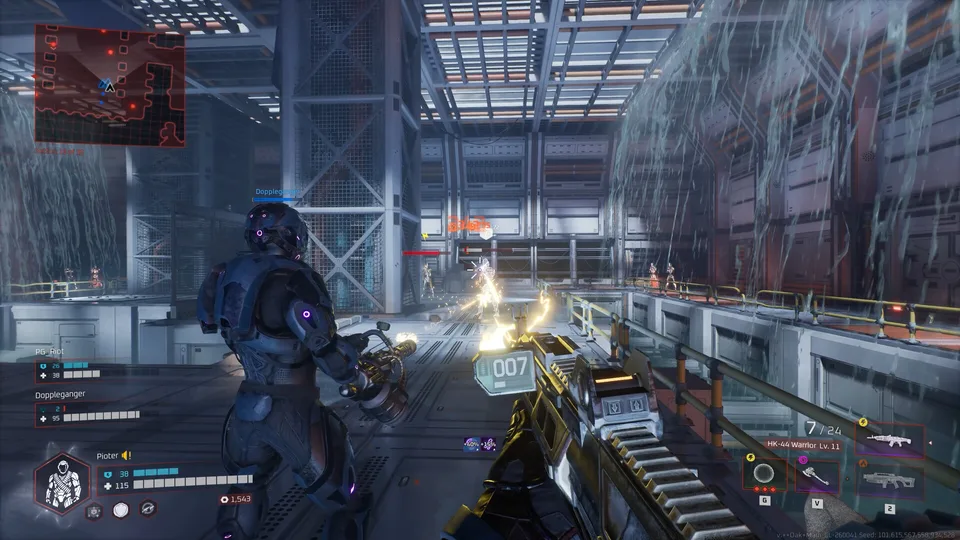
Discover how crossplay multiplayer works in Deadzone Rogue 2, covering online co-op options, cross-platform matchmaking, and team progression.
Published: Deadzone Rogue 2 Wiki Editorial Team
Table of Contents
Understanding Crossplay and Multiplayer in Deadzone Rogue 2
The inclusion of robust cooperative features is often a deciding factor for fans of sci-fi roguelite shooters. In Deadzone Rogue 2, developer Prophecy Games has designed the campaign to support both solo adventurers and squads of up to three players. When jumping into online sessions, the implementation of crossplay ensures that finding teammates across different hardware ecosystems remains frictionless.
For players tracking trial releases, it is worth noting that the Deadzone Rogue 2 Demo provides a designated entry point to test mechanics before the full launch. According to community reports and early hands-on evaluations, cross-platform functionality operates smoothly during multiplayer sessions, allowing players to coordinate tactical approaches regardless of whether their squadmates are playing on PC or other supported platforms.
Setting Up Online Co-Op and Matchmaking
Getting a squad together in Deadzone Rogue 2 is streamlined through an integrated multiplayer menu accessible straight from the station hub. If you want to play with specific friends, the system accommodates direct invites through account additions or dedicated join codes. This flexibility removes traditional barriers that often complicate cross-platform session creation.
Navigate to the multiplayer menu from the main hub aboard the space station.
Choose your preferred matchmaking preference or generate a join code for friends.
Utilize account-based invites to pull external platform users directly into your lobby.
Verify voice chat settings to ensure seamless communication once the run begins.
Beyond private lobbies with friends, the game supports wider community matchmaking. This ensures that solo players or incomplete squads can quickly fill empty slots with random operators from the global player pool, maintaining active lobbies even during off-peak hours.
Communication and Team Coordination
Cooperative success in an intense first-person roguelite hinges heavily on clear communication. Deadzone Rogue 2 integrates full voice chat capabilities directly into its multiplayer framework. Community feedback highlights this feature as a major strength, allowing teams to discuss weapon synergies, elemental damage choices, and navigational strategies on the fly without relying on third-party voice applications.
The game also implements thoughtful inventory and currency sharing systems designed to minimize friction between teammates. For instance, item drops are instanced uniquely for each player, preventing situations where a teammate accidentally hoovers up a crucial drop. If you wish to share a weapon or specific piece of gear, you can simply pick it up and drop it back down so that your squadmate can claim it. Furthermore, run currency divides equally among participants, while end-of-run damage summaries offer a transparent view of individual performance contributions.
Squad Tactics and Stealth Mechanics
Playing with a full squad of up to three players changes how you approach room clears and enemy aggro. When entering a new area, players initially start in a stealth state where enemies cannot immediately detect them. Coordinating with your team during this phase allows you to position yourselves strategically around choke points or single avenues of approach.
Tip
Use the initial stealth window upon entering a new zone to set up crossfires or isolate high-threat targets before Monarch's biomechanical forces trigger an alert.
Rushing blindly into a room often results in getting flanked by fast melee units or high-accuracy elite enemies. By communicating enemy positions through voice chat, your team can maximize weak-spot damage—tracked visually by changing damage numbers—and execute elemental status effects like chain-lightning or ice-shattering combos more efficiently.
Frequently Asked Questions
Does Deadzone Rogue 2 require a third-party account for crossplay?
Community reports and platform guidelines indicate that standard platform connection tools and join codes manage matchmaking, though players should review the in-game EULA and network prompts upon their first online session.
Can I play Deadzone Rogue 2 entirely solo?
Yes. While up to 3-player co-op is fully supported, the campaign is built to accommodate solo players who prefer tackling Monarch's mechanical hordes entirely on their own terms.
Is the Deadzone Rogue 2 Demo required to play the full game?
No. The demo hosted on the Steam Demo Page is a separate trial version meant for previewing upcoming content and should not be confused with the full release found on the main Steam Store Page.