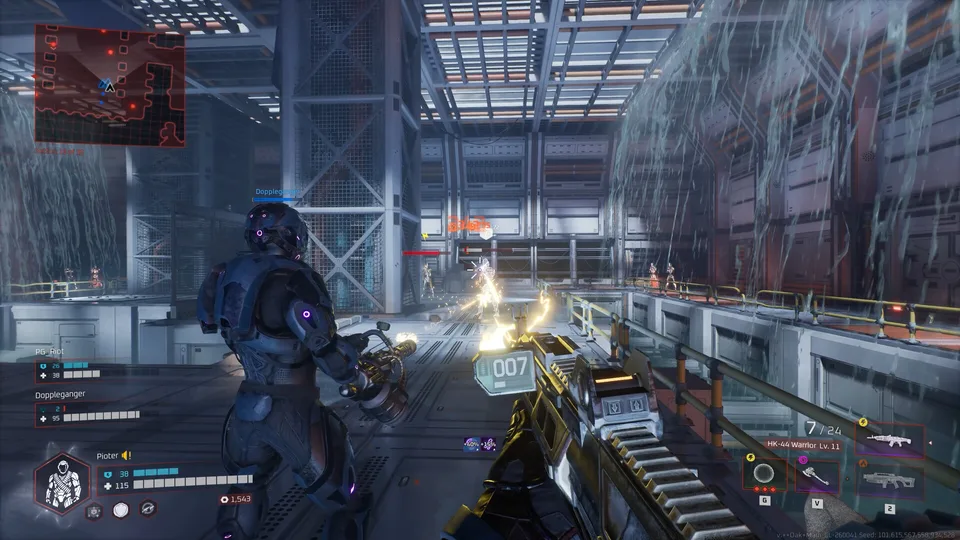
How to Clear the Homecoming Mission in Deadzone Rogue 2
Master the Homecoming mission in Deadzone Rogue 2 with our tactical guide. Learn how to navigate the mission, defeat the Destroyer, and survive the Deadzone.
Published: Deadzone Rogue 2 Wiki Editorial Team
Table of Contents
Navigating the Homecoming Mission
The Homecoming mission in Deadzone Rogue 2 serves as a high-stakes gauntlet, tasking players with traversing the remnants of the ISSX colony project and the abandoned Sky Lift Resort. As Talon 13-10, your primary goal is to reach the prototype hangar to secure a new ship, all while contending with the omnipresent threat of the AI known as Monarch.
The mission is characterized by verticality and environmental hazards. You will navigate through tram stations, observation decks, and construction zones that were once intended for high-end space tourism. The atmosphere is tense, marked by the discovery of biomass and hostile robotic entities that require constant vigilance. Whether you are playing solo or in a squad of up to three, success depends on your ability to adapt your loadout to the shifting threats within the Deadzone.
Tactical Steps to Survive the Homecoming Mission
Successfully reaching the extraction point requires precise movement and effective combat management. Based on gameplay observations, follow these strategic steps to push through the mission.
Cross the Bridge: After waking up, move across the bridge to access the working lift. This takes you down to the ground level where the military base was stationed.
Clear the Sky Lift Resort: Fight through the remnants of the resort. Watch out for robotic units and environmental hazards. Utilize the provided cover, as the area is shielded and offers limited protection.
Locate the Prototype Hangar: Once you reach the lower levels, the original hangar may be destroyed. You must navigate to the prototype hangar located on the other side of the facility.
Engage the City Destroyer: This is the mission's climax. You will face a City Destroyer machine. Do not attempt to outrun it; you must stand your ground or utilize the environment to survive its assault.
Establish Connection: Once the Destroyer is dealt with, connect your suit to the facility's systems to prevent Monarch from hacking your equipment, allowing you to secure your new ship.
Combat Strategies and Loadout Tips
The combat in Deadzone Rogue 2 is fast-paced and roguelite-focused. Players often find that balancing weapon damage and movement speed is critical for survival.
Tip
Optimize Your Build: Many players suggest that focusing on specific damage types—such as separating gun damage from general weapon damage—can be confusing. Focus on stacking augments that complement your playstyle rather than trying to optimize every stat equally. If you find a weapon you enjoy, prioritize upgrading its core damage output first.
Community feedback highlights that the lack of shop rerolls can make loadout acquisition feel RNG-dependent. If you are struggling, save your credits for critical moments where a specific gear piece can change the tide of a run.
Managing the Threat of Monarch
Monarch is not just a boss; it is an environmental force that actively terraforms Earth. During the Homecoming mission, you will notice its influence on the robotic enemies you face.
Biomass Interaction: You may notice biomass within your suit. According to narrative context, this is protecting you from Monarch’s influence. Keep an eye on your status as you progress.
Co-op Coordination: If playing with friends, use the drop-in co-op feature to ensure your squad is always at full strength. Coordination is vital when dealing with high-threat targets like the City Destroyer, as one player can distract while others focus on DPS (damage per second).
Community Insights and Common Issues
The Deadzone Rogue 2 community has been highly active, providing significant feedback following the playtests and the demo launch. Here are some of the most common observations shared by veteran players:
Performance: Some players have reported performance hitches or "jerky" gameplay even at high frame rates. Ensure your drivers are updated to minimize potential shader compilation issues.
Difficulty Spikes: The City Destroyer is a major difficulty hurdle. If you are struggling, consider teaming up via the server browser to increase your squad's firepower.
Shop Mechanics: Many players have expressed a desire for a reroll mechanic in shops to mitigate bad RNG. Adapt your playstyle to the weapons you find rather than hunting for a "perfect" build every time.
FAQ: Frequently Asked Questions
Is the demo for Deadzone Rogue 2 the same as the full game?
No. The demo is a specific slice of content meant for testing and feedback. It is more polished than the playtest but does not represent the full game's scope.
Does progress carry over to the full game?
No. The developers have confirmed that progression, including unlocked gear and levels, will not carry over from the demo to the full release.
Can I play solo?
Yes. While the game supports co-op for up to three players, the entire mission is fully playable in solo mode.
What should I do if I encounter a bug?
The developers at Prophecy Games encourage users to submit feedback through official channels like their Discord or the Steam community forums. Reporting specific bugs, such as checkpoint failures or soft locks, helps improve the final release.
For those looking to stay updated on the game's development, visiting the official Deadzone Rogue 2 Steam Store page is the best way to track news and upcoming patches.